
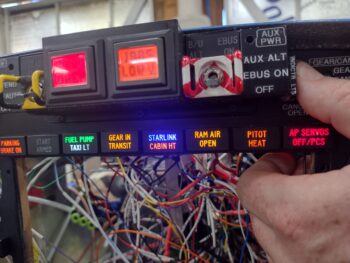
A few days ago I had 3 distinct electrical issues: the nose gear switch putting the nose gear down, the landing brake ancillary functions/notifications not aligning with the switch, and the top row indicator lights push-to-test button not working and popping fuses after every possible initial “fix.”
Well, as this build goes it’s taken a day each (along with other tasks) to get each issue resolved. For the indicator lights, yesterday I had to disassemble a number of the connections both at the test power leads and the light power connectors in my attempt to test every circuit, which I originally believed was a simple miswiring of the circuitry.
As I was doing my continuity tests I kept getting an errant connection to ground on all the test wires, which should all should only go to power BEFORE the PTT button switch was engaged. It was clear: I had mole somewhere in the system. But what wire and what circuit?
 Again, as I noted yesterday, I discovered that in my haste to add the new AP SERVOS OFF/PCS indicator light I misread the type of output the Trio autopilot was using for this signal. I took it at as positive power vs ground. Ooops! I had inadvertently wired in a ground wire to the bundle that was coming in through the light main power feed, and moreover had at some point blown out (destroyed) the protective diode that was there to protect the circuit feed (or it was dead when I installed it). When I tested the installed diode on this circuit it was clearly inoperative.
Once I removed that bad connection, my first task was to correct that circuit to allow the depressed autopilot servo disconnect/pilot controlled steering (PCS activates with a greater than 5 second button push: allows the pilot to manually steer the plane for a bit, release the PCS which will then hand control back over to the autopilot) indicator light to illuminate.
The issue with my original mis-ID’ing of this alarm output high vs low is that I now had a constant hot feed to contend with that goes through the control stick’s multiple ground outputs. I had no way to isolate —without cracking the control stick open— exactly what ground circuit was on the other end of the wiring. This forced me to control what I only had access to. And other than simply abandoning this function and removing the light, this drove me to only one viable required solution for this control issue: a relay (yep!).
Which you can see down in the open corner of the HXr EFIS opening. As you can also see that this relay allowed this circuit to work.
 It also allowed me to reconnect all the indicator lights’ wiring and get those fired up as designed via pushing my Push-to-Test button on the side of the Warning Annunciator Sub-panel.
One unintended consequence, however, after I wired all these wires back up was that if I pushed the control stick AP servos disconnect button, all the indicator lights fired up… so it was either shorting out the entire light panel, or powering them collectively (sigh).
After messing around testing out another diode and even some high value resistors, in the end I simply punted and cut the test lead to the AP servo indicator light… meaning that it works as required when the control stick button is pushed, but from here on out it does NOT light up with the other lights when the PTT button is pushed. Facts known, dealt with, and pressing forward.
 I’ll state that I did a good half hour worth of assessment on where exactly to mount my SkyRadar ADS-B IN receiver, now that I know that it must be aligned on all axes in relation to the aircraft centerline. To attain this alignment, along with ease of power connection and my brand new requirement of remotely mounting the 2 antennas, I decided to test mount it on the inboard side of the Garmin GNS-480 mounting tube. I further determined that only #6 110° CS aircraft grade screws provide internal clearance for securing anything to the mounting tube, so I started some initial test component designs in CAD and kicked off some 3D prints on those bits…. after I tweaked and 3D printed the latest version of the right side GPS puck mounting plate to test out before making.
I then spent a good 45 minutes installing and securing the hardware on the quite difficult to access P3 connector (kinda visible upper left corner of pic behind wires). Another insane-to-get-to job complete.
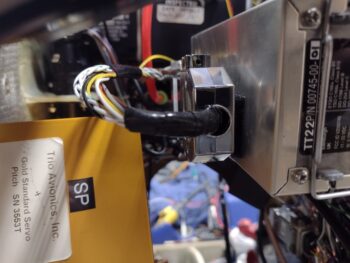
I then added some strips of Velcro onto the inboard side of the Trig TT22 transponder GRT serial adapter and backshell to attach it to the transponder itself. Here is the adapter with the interconnecting wire pigtail I made yesterday, shown from the front side looking aft.
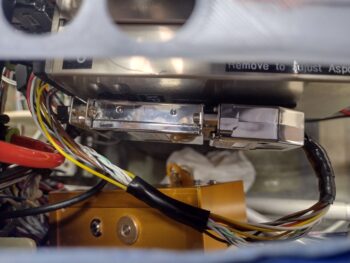
 And a shot looking down at the transponder serial adapter/wiring pigtail install. I need to pick up some 1/4″ 4-40 screws to finish attaching the D-Sub connectors, which I’ll do tomorrow. After the D-Subs are fully secured, I’ll then zip tie the wiring and the adapter to the transponder which will complete the install for not only the serial adapter and pigtail, but the transponder itself.
 As for component power up tests, I’m happy to report that both the roll trim and pitch trim systems and actuators all powered up nicely and are working a treat.
Pushing forward!